Listmagify – A Split-View Playlist Editor for Spotify
Spotify is optimized for listening. When it comes to editing playlists, however, you are limited to working on one playlist at a time. For anyone who actively curates music across multiple lists, this quickly becomes inefficient.
Listmagify started as a small side project to address exactly that limitation. I built it to solve my own day-to-day experience with playlist editing—where the tools were reliable, but the workflow was not designed for managing several playlists in parallel.
A Workspace for Playlist Curation
Listmagify provides a focused editing environment for Spotify playlists:
- Multi-Panel Editor – Open several playlists at once and arrange them horizontally or vertically.
- Drag & Drop – Move or copy tracks between playlists or reorder them within a list.
- Bulk Operations – Select many tracks and apply changes in a single action.
- Flexible Sorting & Search – Sort by metadata or instantly filter large playlists.
- Liked Songs Access – Use your saved tracks as a source for playlist building.
- Integrated Player – Preview tracks without leaving the editor.
- Safe, Real-Time Editing – Changes sync directly with Spotify, with panel locking to prevent mistakes.
The intent was to create a workspace that feels closer to file managers or professional editors than to a traditional music player.
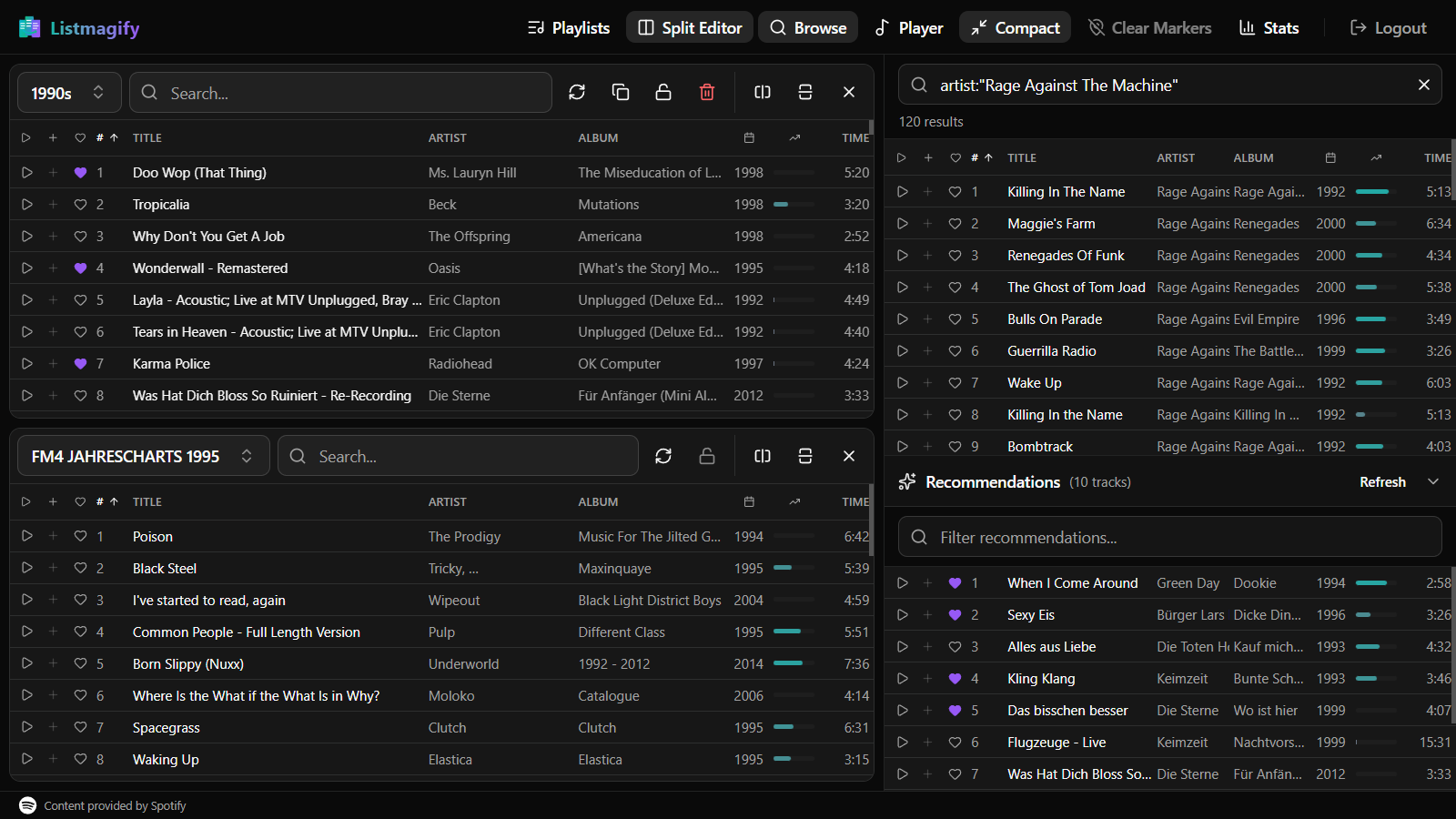
Multi-Playlist Insertion Markers
One feature that grew directly out of my own usage is Multi-Playlist Insertion Markers.
You can define insertion points in several playlists at the same time. When markers are active, adding a track inserts it into each playlist at the respective position. This makes it practical to maintain related playlists—such as variations by mood, context, or audience—without repeating the same operation over and over.
Conservative, Pattern-Based Recommendations
Listmagify also includes a lightweight recommendation system. This emerged from observing how I reused and reordered tracks across playlists, rather than from an attempt to automate curation.
Recommendations are based on simple, observable patterns—such as which tracks tend to appear next to or alongside others in playlists you open in the editor. Only those open playlists are considered, and suggestions remain explicitly optional. The system is intended to support discovery and consistency, not to make decisions on your behalf.
Who It’s For
While Listmagify started as a personal side project, it has proven useful for a range of playlist workflows:
- DJs and event planners managing setlists,
- music curators maintaining multiple collections,
- fitness and activity playlist builders,
- and anyone who treats playlists as something to actively organize and refine.
Try It
Listmagify is free to use, requires a Spotify account, and edits playlists directly in your Spotify library.
You can try it at: https://listmagify.com